
If you have ever picked a film from a streaming menu late at night, you have used VOD. But what is VOD exactly, how does it work, and how is it different from IPTV? The terms are often mixed up, so this guide explains them in plain English, with simple examples.
Key takeaways
- VOD means Video on Demand: you choose what to watch and when.
- There are four main VOD models: SVOD, AVOD, TVOD and FVOD.
- IPTV is about live channels; VOD is about a library you start anytime.
- Mom IPTV includes both: live TV plus 121,000+ movies and series, testable with a free trial.
Table of Contents
What Is VOD? A Simple Definition
VOD stands for Video on Demand. It is any system that lets you watch video when you want, rather than at a time set by a broadcaster. You open a library, choose a title and press play. You can pause, rewind, skip forward and come back later.
Classic TV works the other way: channels follow a schedule, and if you miss the start of a show you miss it. VOD gave control to the viewer. The concept is described in detail on Wikipedia’s video on demand page.
Where Did VOD Come From?
The first VOD services appeared in the 1990s on cable and hotel TV systems, where you could order a film to your room. In the 2000s, faster broadband made it possible to stream films at home. Today VOD is everywhere: on Smart TVs, phones, game consoles and inside IPTV apps.
How Does VOD Work?
Behind the play button, three things happen:
- Storage: films and episodes are stored on servers, often copied to many locations around the world through a content delivery network.
- Encoding: each title is prepared in several qualities, from SD to 4K, using codecs such as H.264 or H.265.
- Adaptive streaming: your app measures your connection and picks the best quality it can play without stopping, switching up or down as your speed changes.
This is why a film may start a little blurry and become sharp after a few seconds: the player is testing your connection.
The 4 Types of VOD
Video on demand services make money in four different ways.
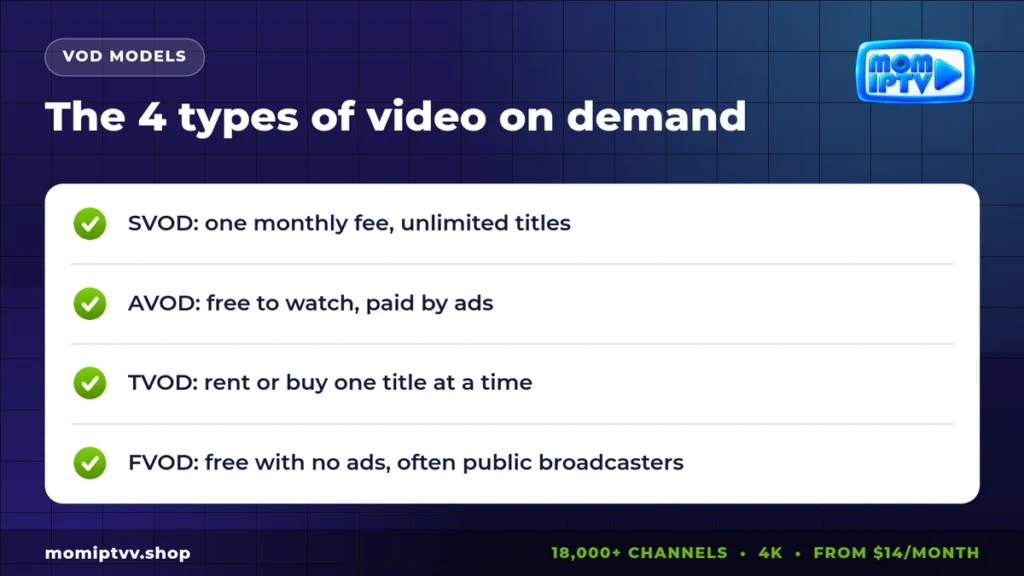
SVOD: Subscription Video on Demand
You pay a monthly fee and watch as much as you want from the catalogue. Most big streaming platforms work like this.
AVOD: Advertising Video on Demand
The content is free, and ads pay for it. You watch a few commercials before or during the video.
TVOD: Transactional Video on Demand
You pay per title, either to rent it for a short time or to buy it for your library. New films often arrive on TVOD first.
FVOD: Free Video on Demand
Free content with no ads, often from public broadcasters’ catch-up services or from creators who share their work.
What Is IPTV?
IPTV, or Internet Protocol Television, delivers TV channels over the internet. Its heart is live TV: a list of channels that play continuously, with a program guide, just like cable. Many IPTV services also add catch-up (replay of recent programs) and a VOD library.
With Mom IPTV, for example, you get 18,000+ live channels from 98+ countries and 121,000+ movies and series on demand in the same app.
IPTV vs VOD: The Key Differences
So, what is VOD compared with IPTV? Think of IPTV as a television and VOD as a video library.
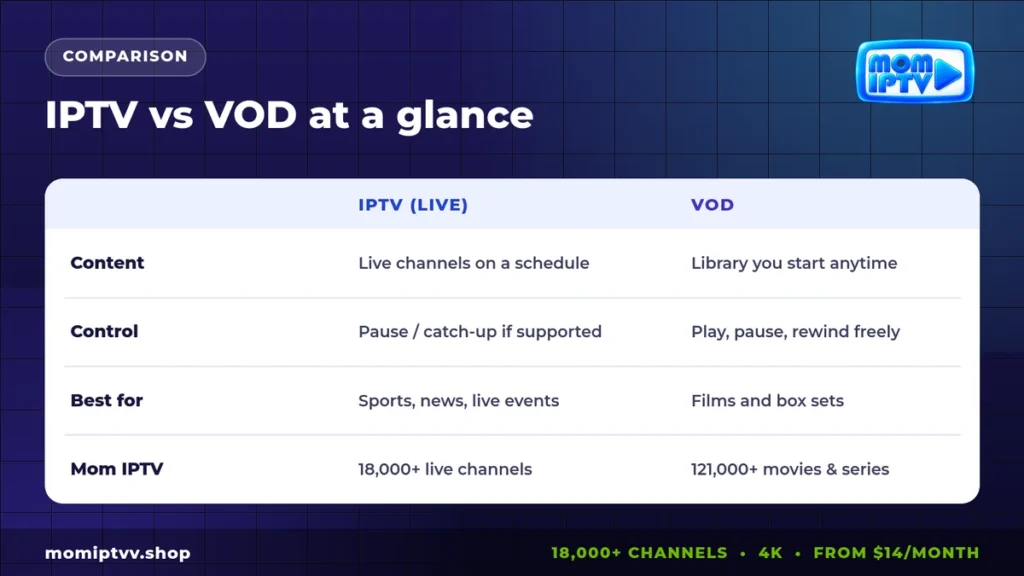
| Point | IPTV (live) | VOD |
|---|---|---|
| What you watch | Channels that play on a schedule | Titles you start yourself |
| Control | Pause and catch-up on supported channels | Full control: play, pause, rewind |
| Best for | Sports, news, live shows, zapping | Films, series, documentaries |
| Example | A live match on a sports channel | Starting season 1 of a series |
In practice, the best services combine both. You watch the evening news live, then switch to a film from the library without leaving the app.
VOD vs OTT: Another Common Mix-Up
OTT means “over the top”: content delivered over the open internet rather than through an operator’s private network. OTT describes the delivery method. VOD describes the viewing method. A service can be OTT and VOD at the same time, which is the case for most streaming platforms. Read more in our guide IPTV vs internet TV.
Do IPTV Services Include VOD?
Most modern IPTV services do. In player apps such as IPTV Smarters Pro or TiviMate, you will usually see three sections: Live TV, Movies and Series. Movies and Series are the video on demand part.
When you compare providers, check the size of the VOD library, how often it is updated, whether series are organized by season and episode, and whether subtitles are available. Our list of the best IPTV player apps shows which apps have the nicest VOD menus.
Pros and Cons of VOD
Pros
- Watch what you want, when you want.
- Pause, rewind and continue later on another device.
- Huge choice of films and series.
Cons
- Live events, news and sports are better on live channels.
- Content is split between many paid platforms.
- Needs a good connection for HD and 4K.
How Much Internet Do You Need for VOD?
| Quality | Speed | Data per hour |
|---|---|---|
| SD | 3 to 5 Mbps | About 1 GB |
| HD / Full HD | 8 to 10 Mbps | 2 to 3 GB |
| 4K | 25 Mbps | About 7 GB |
If your Wi-Fi is weak, our IPTV router guide explains how to improve it.
Live TV and 121,000+ titles on demand
18,000+ live channels, 121,000+ movies & series, HD to 4K on every device. Plans from $14/month with a money-back guarantee of up to 45 days.
Get Live TV and VOD Together With Mom IPTV
Why choose between live TV and a film library? Every Mom IPTV plan includes both, with HD to 4K quality, EPG and catch-up on many channels. You can watch on Smart TVs, Firestick, Android, iPhone, computers, Apple TV and MAG boxes.
Check the Mom IPTV prices, from $14 per month, or start with a free 24-hour trial.
What Is VOD: FAQ
What does VOD stand for?
VOD stands for Video on Demand: video you can start whenever you want, instead of waiting for a scheduled broadcast.
Is Netflix VOD or IPTV?
Netflix is VOD, more precisely SVOD (subscription video on demand). It does not offer a list of live TV channels like IPTV.
Does IPTV include VOD?
Many IPTV services include a VOD library next to live channels. Mom IPTV includes 121,000+ movies and series in every plan.
What is the difference between VOD and OTT?
OTT describes how content is delivered: over the open internet. VOD describes how you watch: on demand. Most OTT services offer VOD, and some also offer live channels.
How much data does VOD use?
About 1 GB per hour in SD, 2 to 3 GB per hour in HD and around 7 GB per hour in 4K.
Final Thoughts
Now you know what is VOD: video you control, available whenever you want it. IPTV brings the live side of television, and the best services combine both in one app. If you want news and matches live, then films and series on demand, a combined service gives you everything in one place and for one price.