
The IPTV vs satellite TV question comes up in almost every home that is tired of high TV bills. Both systems bring live channels to your screen, but they do it in very different ways. One uses a dish on your roof and a signal from space. The other uses the internet connection you already pay for.
In this guide we compare the two on the points that really matter: price, picture quality, choice of channels, installation, reliability and flexibility. At the end you will know which one fits your household.
Key takeaways
- IPTV streams channels over the internet; satellite TV receives them through a dish.
- IPTV wins on price, channel choice, multi-screen use and installation time.
- Satellite TV still makes sense in rural areas with slow or no internet.
- You can test IPTV at home with a free 24-hour Mom IPTV trial.
Table of Contents
What Is IPTV?
IPTV means Internet Protocol Television. The channels travel as data over your broadband connection, just like a video on YouTube or Netflix. You watch them through an app on a Smart TV, a Firestick, a phone, a tablet or a computer.
A provider such as Mom IPTV gives you a login. You enter it in a player app and you see live channels, a TV guide and a library of movies and series. There is no dish, no cable to the roof and no technician visit.
What Is Satellite TV?
Satellite television sends channels from a ground station to a satellite in orbit, which then broadcasts them back to Earth. A dish on your home collects the signal, and a receiver box decodes it for your TV. The technology is explained well on Wikipedia’s satellite television page.
There are two kinds of satellite TV: free-to-air channels that anyone with a dish can watch, and pay-TV packages that need a subscription and a decoder card.
IPTV vs Satellite TV: The Key Differences at a Glance
Here is the short version before we go into detail.
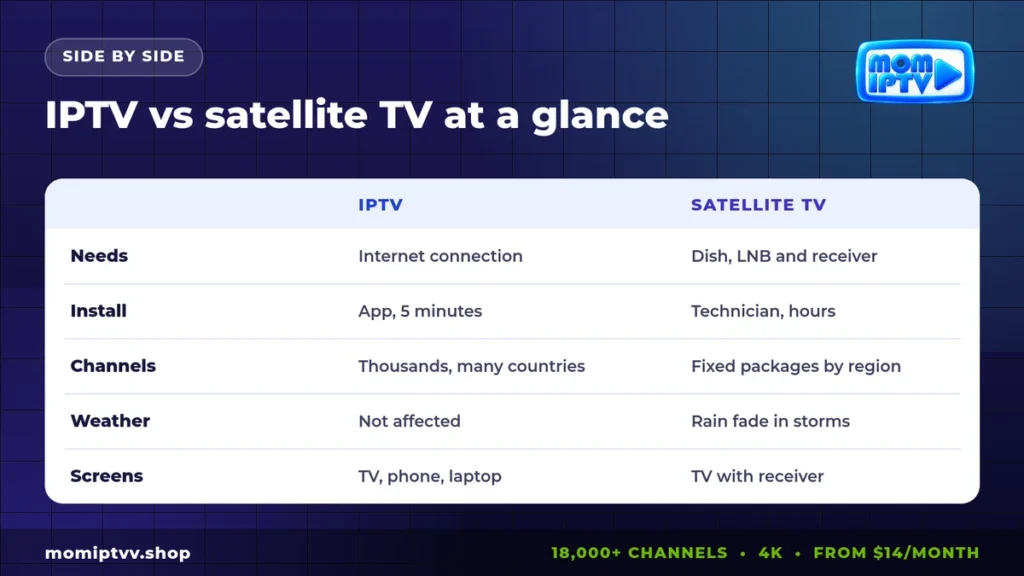
| Point | IPTV | Satellite |
|---|---|---|
| Equipment | Your current TV or device + an app | Dish, LNB, cables and a receiver |
| Installation | About 5 minutes, done yourself | Often a technician, sometimes roof work |
| Channel choice | Thousands of channels from many countries | Fixed packages for one region |
| On-demand content | Large movie and series library | Limited, often extra cost |
| Screens | TV, phone, tablet, laptop | Mainly TVs with a receiver |
| Weather | Not affected by rain | Can lose signal in heavy rain or snow |
| Needs internet | Yes | No |
Cost: Which One Is Cheaper?
Cost is where most people make their decision, and IPTV usually wins clearly.
With pay satellite TV, you often pay a monthly package, a decoder rental, extra fees for sports or premium channels and sometimes an installation charge. Many contracts also lock you in for 12 or 24 months.
With IPTV, you pay one subscription. At Mom IPTV, plans start at $14 for one month and drop to about $5.33 per month on the 12-month plan. Every plan includes all channels, sports, movies and series. See the full list on our pricing page.
Free-to-air satellite is the exception: once the dish is installed, the channels cost nothing. But the choice is limited to what broadcasters send for free in your region.
Picture Quality, Buffering and Delay
Satellite TV delivers a steady picture as long as the dish is aligned and the sky is clear. Quality is HD on most modern packages, with some 4K channels.
IPTV quality depends on your internet speed and the provider’s servers. With 10 Mbps you get stable HD, and with 25 Mbps you can watch 4K. A good provider uses load-balanced servers and backup streams so channels do not freeze during big matches.
One honest point: live IPTV can be a few seconds behind satellite. For most viewers it makes no difference. For sports fans who bet live or follow scores on their phone, it is worth knowing.
Installation and Equipment
Installing a dish means choosing a spot with a clear view of the sky, mounting the dish, aiming it precisely and running a cable to the receiver. Renters often need permission from the landlord, and some buildings do not allow dishes at all.
IPTV needs none of that. You install an app, type your login and start watching. If you move house, you take your subscription with you. Our setup guide shows the steps for every device with screenshots.
Channel Selection and Flexibility
Satellite packages are built for one country or region. If you want channels from another country, you usually need a second dish aimed at another satellite, plus another subscription.
IPTV removes those borders. A single Mom IPTV subscription includes 18,000+ live channels from 98+ countries: news, entertainment, kids, documentaries, music and sports. You also get 121,000+ movies and series that you can start at any time. For expatriate families, this is often the main reason to switch.
Reliability and Weather
Heavy rain, snow or thick clouds can weaken the satellite signal and cause “rain fade”: the picture freezes or disappears until the storm passes. Strong wind can also move the dish out of alignment.
IPTV is not affected by the weather. Its weak point is your internet connection. If your broadband goes down, IPTV stops. A wired connection and a good router make a big difference; see our guide to the best IPTV router for tips.
Watching on Several Screens
With satellite, each TV usually needs its own receiver or a multi-room option at extra cost. Watching on a phone or laptop is possible with some operators’ apps, but not with every package.
IPTV was made for multiple screens. The same subscription works on a living-room TV, a bedroom Firestick, a phone on the train and a laptop in a hotel. Mom IPTV plans cover 1, 2 or 3 devices at the same time.
When Satellite TV Still Makes Sense
We run an IPTV service, but we want this comparison to be fair. Satellite is still the better choice in some situations.
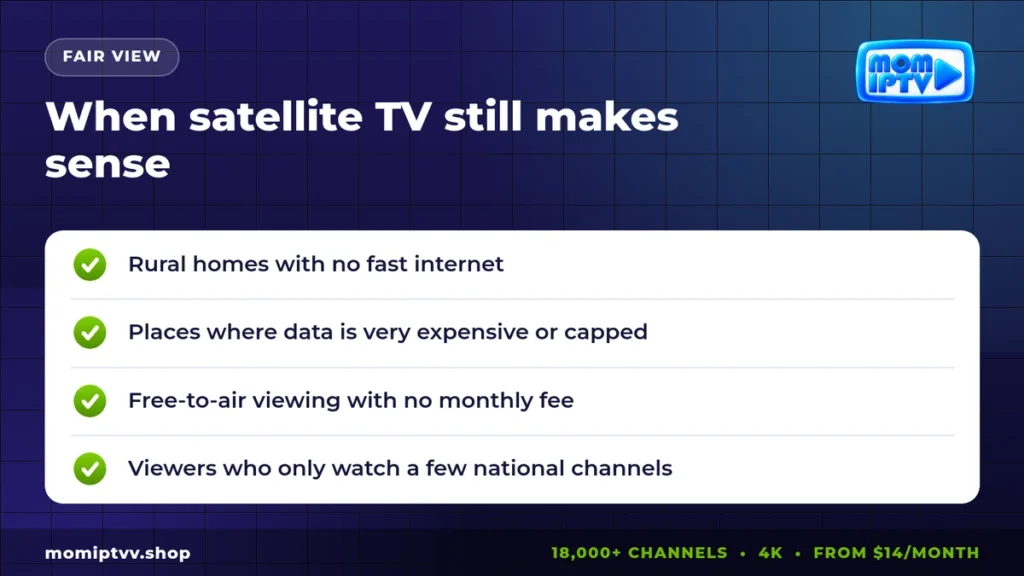
- You live in a rural area where internet is slow, unstable or not available.
- Your internet plan has a small data cap or very high prices per gigabyte.
- You only watch a handful of free national channels and want no monthly bill.
- You already own a dish and it covers everything you watch.
Many households also combine the two: free-to-air satellite for national channels, IPTV for international channels, sports and on-demand films.
Which One Should You Choose?
Use this simple rule:
- Choose IPTV if you have at least 10 to 25 Mbps of stable internet, want channels from several countries, watch on more than one screen or want to pay less.
- Choose satellite if your internet is weak or capped, or if free national channels are enough for you.
If you are still unsure, test before you decide. A free trial costs nothing and shows you exactly how IPTV performs on your own connection. You can also compare IPTV with online streaming apps in our guide IPTV vs internet TV.
How to Switch From Satellite TV to IPTV
- Run a speed test at the hour you usually watch TV, for example on Speedtest.
- Request a free IPTV trial and install a player on your main TV.
- Watch your usual channels for 24 hours, including an evening match or show.
- Choose a plan with the number of screens you need.
- Check your satellite contract end date before cancelling to avoid fees.
Switch from a dish to IPTV in minutes
18,000+ live channels, 121,000+ movies & series, HD to 4K on every device. Plans from $14/month with a money-back guarantee of up to 45 days.
The Verdict on IPTV vs Satellite TV
For most connected homes in 2026, IPTV is the better choice. It is cheaper, it offers far more channels, it works on every screen and it takes minutes to install. Satellite keeps its place where the internet is not good enough, and as a free source of national channels.
The best way to decide is to try. With Mom IPTV you can test 18,000+ channels on your own TV for 24 hours, with no credit card and no commitment.

IPTV vs Satellite TV: FAQ
Is IPTV better than satellite TV?
For most homes with a stable internet connection, yes. IPTV offers more channels, works on every screen, needs no dish and costs less. Satellite TV stays useful where internet is slow or unavailable.
Does IPTV work during rain or storms?
Yes. IPTV travels through your internet line, so it is not affected by rain fade the way a satellite dish can be. A power or internet cut affects both systems.
What internet speed do I need to replace satellite TV with IPTV?
About 10 Mbps per HD stream and 25 Mbps per 4K stream. Add more if several people watch at the same time.
Can I keep my satellite dish and add IPTV?
Yes. Many households keep free-to-air satellite channels and add IPTV for international channels, sports and on-demand movies.
Is IPTV cheaper than satellite TV?
Usually. Pay-TV satellite packages often cost much more per month, while Mom IPTV starts at $14 per month with no equipment fee and no long contract.
Final Thoughts
The choice between IPTV and satellite comes down to your internet connection and what you watch. If your broadband is solid, IPTV gives you more for less. If it is not, a dish is still a reliable friend. Whatever you choose, compare the total yearly cost, not only the monthly price.
Curious where TV is heading next? Read our article on the future of IPTV.