
Every live channel you watch online starts with an IPTV encoder. It is the device or software that takes a video signal and turns it into a stream that can travel across the internet. If you run a TV channel, a hotel system, a church broadcast or a sports venue, the encoder is the heart of your setup.
This guide explains how IPTV encoders work, the difference between HDMI and SDI models, the codecs and protocols you will meet, and how to pick the right one.
Key takeaways
- An IPTV encoder compresses video and packages it for IP networks.
- HDMI suits short, simple setups; SDI is the professional standard.
- H.265 cuts bandwidth in half compared with H.264 at the same quality.
- Viewers do not need an encoder: they only need a player and a subscription such as Mom IPTV.
Table of Contents
What Is an IPTV Encoder?
A raw video signal is huge. One minute of uncompressed Full HD video can take several gigabytes. An IPTV encoder solves this by compressing the video with a codec and wrapping it in a streaming format. The result is small enough to send over a network in real time.
Encoders exist as dedicated boxes (hardware) or as programs running on a computer (software). Both do the same basic job.
How an IPTV Encoder Works
The process follows five steps.
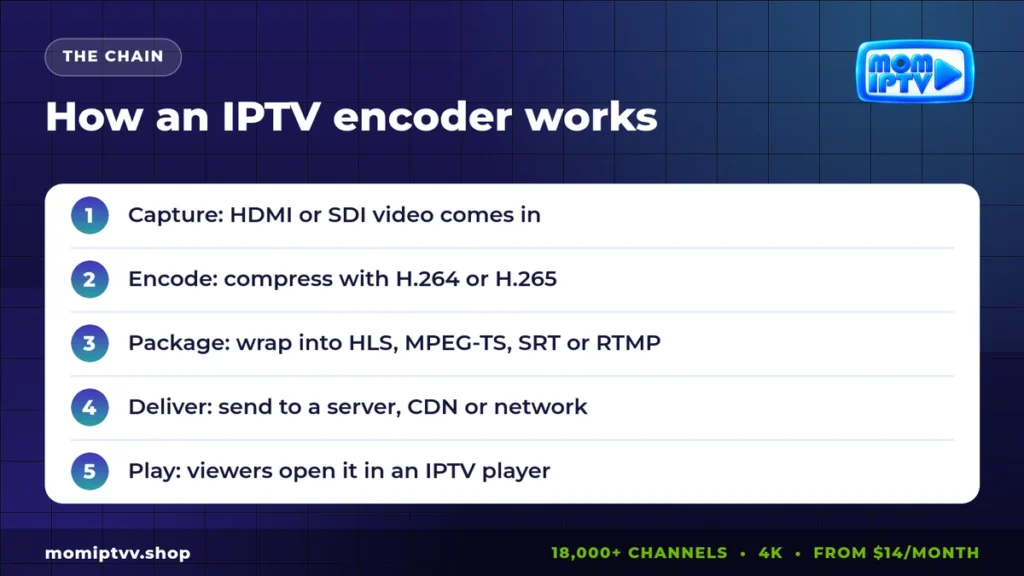
- Capture: the encoder receives video and audio through HDMI, SDI or another input.
- Compression: a codec such as H.264 or H.265 removes redundant information.
- Packaging: the compressed stream is placed in a container and protocol, such as MPEG-TS, HLS, RTMP or SRT.
- Delivery: the stream goes to a streaming server, a content delivery network or a local network.
- Playback: viewers open the stream in an IPTV player on their TV, phone or computer.
HDMI vs SDI Encoders
The input type is the first choice you make.
- HDMI encoders take video from consumer devices: cameras, laptops, receivers and game consoles. They are affordable and easy to use, but HDMI cables are best kept short.
- SDI encoders use the professional broadcast connection. SDI cables lock in place and can run long distances, which is why studios and stadiums prefer them. Read more about the standard on Wikipedia’s SDI page.
Codecs: H.264 vs H.265 (HEVC)
The codec decides how much data the stream needs.
| Codec | Strength | Weakness | Typical use |
|---|---|---|---|
| H.264 (AVC) | Plays on almost every device | Needs more bandwidth | HD channels, wide compatibility |
| H.265 (HEVC) | Same quality at about half the bitrate | Needs newer devices | 4K channels, limited bandwidth |
| AV1 | Very efficient and royalty-free | Fewer hardware encoders today | Next-generation streaming |
Mom IPTV uses efficient H.265 encoding on many channels, which gives a sharp picture while using less bandwidth. Our article on the future of IPTV explains where codecs are heading.
Streaming Protocols: HLS, MPEG-TS, RTMP and SRT
- HLS: the most compatible format for viewers, used by phones, browsers and Smart TVs.
- MPEG-TS over UDP: common inside managed networks such as hotels and operators, often with multicast.
- RTMP: an older protocol still used to send streams to platforms.
- SRT: a modern protocol that keeps streams reliable over the open internet. See the SRT Alliance for details.
Types of IPTV Encoders
Single-channel encoders
One input, one stream. Ideal for a single camera, an event or a small channel.
Multi-channel encoders
Four, eight or more inputs in one chassis. Hotels, hospitals and campuses use them to stream many TV sources at once.
4K encoders
Built for Ultra HD sources, usually with H.265 to keep the bitrate under control.
Transcoders
They take an existing stream and convert it into other qualities or formats, for example to create HD, SD and mobile versions.
Software encoders
Programs such as OBS Studio or FFmpeg turn a computer into an encoder. They are flexible and cheap, but depend on the computer’s stability.
Hardware vs Software Encoders
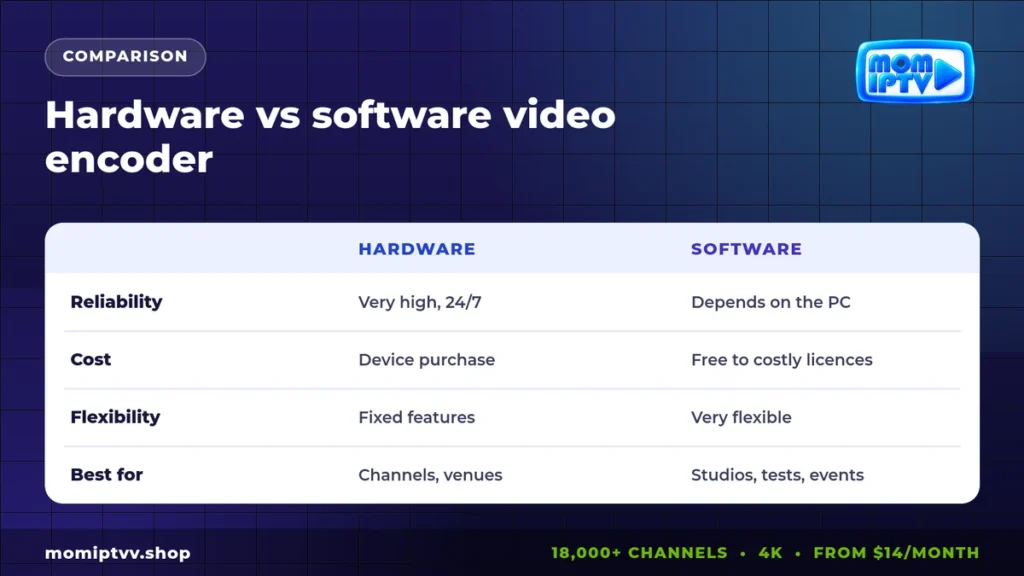
Hardware video encoders are built to run 24 hours a day without crashing, which makes them the choice for permanent channels. Software encoders shine for studios, tests and events, where flexibility matters more than round-the-clock reliability.
Key Specs to Check Before You Buy an IPTV Encoder
- Number and type of inputs (HDMI, SDI, IP).
- Maximum resolution and frame rate (1080p60, 4K60).
- Supported codecs (H.264, H.265) and protocols (HLS, SRT, UDP, RTMP).
- Number of simultaneous output streams.
- Audio options, subtitles and closed captions.
- Management: web interface, API and remote monitoring.
- Power, cooling and rack mounting for permanent installs.
Where the Encoder Fits in the Bigger Picture
The encoder is only the first link in the chain. After it come streaming servers, load balancers, backup streams and content delivery networks that bring the channel close to viewers. Then the viewer’s own network and player play their part. A strong chain end to end is what gives a smooth picture at prime time.
On the viewer side, a good router and a modern player make a big difference. See our guides to the best IPTV router and the best IPTV player apps.
Watch professionally encoded channels in 4K
18,000+ live channels, 121,000+ movies & series, HD to 4K on every device. Plans from $14/month with a money-back guarantee of up to 45 days.
IPTV Encoder FAQ
What does an IPTV encoder do?
It takes a video signal from a camera, receiver or computer, compresses it and turns it into a stream that can travel over an IP network to IPTV players.
What is the difference between HDMI and SDI encoders?
HDMI is common on consumer devices and works over short cables. SDI is a professional standard with locking connectors and long cable runs, used in broadcast studios.
Should I choose H.264 or H.265?
H.264 plays on almost every device. H.265 gives the same quality at about half the bitrate, which is better for 4K and limited bandwidth, but needs newer players.
Which protocol is best for IPTV streaming?
HLS is the most compatible for viewers, SRT is excellent for reliable transport over the internet, and MPEG-TS over UDP is used inside managed networks.
Do viewers need an IPTV encoder?
No. Encoders are for people who create streams. Viewers only need a player app and a subscription.
Final Thoughts
An IPTV encoder turns raw video into a live stream that viewers can watch anywhere. Choose HDMI or SDI based on your sources, H.264 or H.265 based on your audience’s devices, and a protocol that matches your delivery path. And if you simply want to watch great channels rather than build them, try Mom IPTV with a free 24-hour trial, or see our plans from $14.
One Response