
When you order an IPTV subscription, you usually get one of three things: an M3U link, an Xtream Codes login or a request for your device’s MAC address. The M3U vs MAC address question confuses many new users, and the term “IPTV GitHub” adds even more confusion. This guide explains all of it in plain English.
Key takeaways
- An M3U playlist is a link to a list of channels that you paste into a player.
- MAC activation ties your subscription to one device’s hardware ID.
- Xtream Codes is a username and password login that most modern apps prefer.
- IPTV GitHub lists are public playlists of mixed quality, not a supported service.
Table of Contents
What Is an M3U Playlist?
M3U is a simple text format that lists media files or streams. In IPTV, an M3U playlist is a web link that returns a list of channels: each line has a channel name, a logo, a group and a stream address. Your player reads the list and shows the channels in a menu. The format is described on Wikipedia’s M3U page.
An M3U playlist is flexible: you can paste it into IPTV Smarters Pro, TiviMate, VLC, GSE Smart IPTV, Smart IPTV and many others. If your provider updates the channels, the link stays the same and the list refreshes.
Pros of M3U
- Works in almost every player.
- Easy to copy to a new device.
- Can include an EPG link for the TV guide.
Cons of M3U
- Long links are easy to mistype on a TV remote.
- Large playlists can be slow on older devices.
What Is MAC Address Activation?
A MAC address is a unique hardware identifier given to every network device, in the format 00:1A:79:XX:XX:XX. Some IPTV systems use it as the login: the provider registers your device’s MAC on its server, and only that device can connect.
MAC activation is standard on MAG boxes, which use a portal URL plus the registered MAC. Several Smart TV apps, such as Smart IPTV and IBO Player, also show a MAC address on screen and ask you to link your playlist to it on their website. Read more about MAC addresses on Wikipedia.
Pros of MAC activation
- No long link to type on the TV.
- Very simple for older family members: turn on and watch.
Cons of MAC activation
- Locked to one device; a new device needs a new registration.
- You depend on the provider or the app website to make changes.
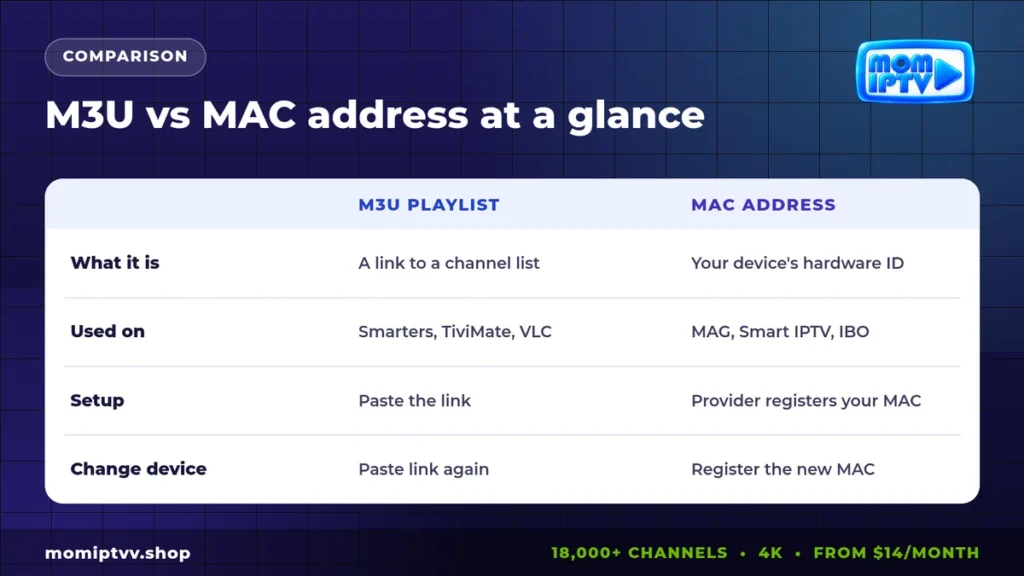
M3U vs MAC Address: Side-by-Side Comparison
| Point | M3U playlist | MAC address |
|---|---|---|
| What it is | A link to a channel list | The hardware ID of your device |
| Common devices | Firestick, Android, iPhone, PC | MAG boxes, some Smart TV apps |
| How you set it up | Paste the link in the player | Provider or app site registers the MAC |
| Changing device | Paste the link again | Register the new MAC |
| EPG | Separate EPG link | Usually included in the portal |
And What About Xtream Codes?
Xtream Codes is a third option and the most popular today. Instead of one long link, you get a server URL, a username and a password. Apps such as IPTV Smarters Pro and XCIPTV use these details to load live TV, movies, series and the guide automatically, already sorted into menus.
If your app supports it, Xtream Codes is usually the most comfortable choice. If not, use the M3U playlist.
Which Login Should You Use on Each Device?
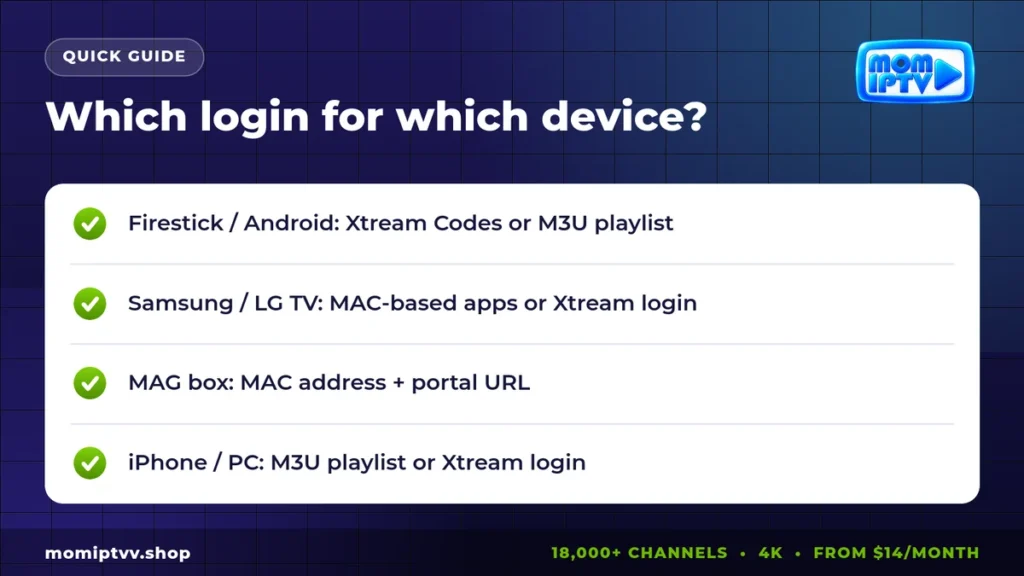
- Amazon Firestick and Android TV: Xtream Codes in TiviMate or Smarters, or the M3U playlist.
- Samsung and LG Smart TVs: Xtream in Smarters, or MAC-based apps like Smart IPTV and IBO Player. See our Smart IPTV setup guide.
- MAG boxes: portal URL plus your registered MAC address.
- iPhone, iPad, Windows and Mac: Xtream or M3U in your favorite player.
- Enigma2 receivers: an installation script or M3U converted for the receiver.
Our Mom IPTV setup guide walks you through each device with screenshots.
What Does “IPTV GitHub” Mean?
GitHub is a platform where developers share code and files. Some users publish IPTV playlists there. The best-known example is a community project that collects links to publicly available, mostly free-to-air channels from around the world.
These lists can be interesting for exploring free channels, but they have clear limits:
- Links break often and there is no support.
- Quality and uptime vary from channel to channel.
- Premium sports, films and many popular channels are not included.
- Some copies of these lists on other sites add unofficial links, which can bring legal and security risks.
If you use public lists, stick to the official project pages and free-to-air channels.
Home Telecom M3U: A Different Category
Some internet companies give their customers an M3U or multicast list for their own TV service inside their network. These lists only work on that operator’s line and are not the same as an IPTV subscription you can use anywhere.
Choosing a Reliable Route
Whatever login you use, the quality comes from the provider behind it. Look for a service that gives you all three login types, a working EPG, real support and a refund policy. For licensed options, see our guide to legal IPTV providers.
Mom IPTV gives you an M3U playlist, an Xtream Codes login and MAG portal access with every plan, plus 24/7 help on WhatsApp to set it up. Try it with a free 24-hour trial or see the plans from $14.
Get M3U, Xtream and MAC access in one plan
18,000+ live channels, 121,000+ movies & series, HD to 4K on every device. Plans from $14/month with a money-back guarantee of up to 45 days.
M3U vs MAC Address: FAQ
What is the difference between M3U and MAC address IPTV?
An M3U playlist is a link to a list of channels that you paste into a player. MAC address activation links your subscription to the unique hardware ID of a device, such as a MAG box or a Smart TV app.
Which is better, M3U or MAC?
Neither is better in general. Use M3U or Xtream Codes on Firestick, Android, iPhone and PC. Use MAC activation on MAG boxes and on Smart TV apps that require it.
What is IPTV GitHub?
It usually refers to public playlists hosted on GitHub, such as community lists of free-to-air channels. Quality and availability vary, and they are not a replacement for a supported subscription.
Can I change my MAC address for IPTV?
You do not change the MAC; you register a new one. If you replace your device, send the new MAC address to your provider so they can move your subscription.
What is Xtream Codes?
Xtream Codes is a login format with a server URL, username and password. Apps use it to load live TV, movies, series and the EPG automatically.
Final Thoughts
In the M3U vs MAC address choice, there is no winner, only the right tool for each device: M3U or Xtream for apps, MAC for MAG boxes and some Smart TV apps. Keep your login details safe, register a new MAC when you change devices, and treat public GitHub lists as a curiosity rather than a TV service.