
If you want to setup Smart IPTV on your television, you are in the right place. Smart IPTV, often called SIPTV, is one of the oldest and most stable IPTV players for Smart TVs. It does not include channels: you load your own playlist, and the app turns your TV into a clean live-TV receiver.
This guide shows how to install the app, find your MAC address, upload your playlist and activate it on Samsung, LG, Fire TV, Android and MAG devices. We also cover the errors people meet most often, with simple fixes.
Key takeaways
- Smart IPTV is a player: you need an M3U playlist from a provider.
- The playlist is linked to your TV’s MAC address on the official website, not typed on the TV.
- After the free trial period, the app needs a one-time activation per device.
- Mom IPTV sends an M3U link that works with Smart IPTV within minutes of your free trial request.
Table of Contents
What Is the Smart IPTV App?
The Smart IPTV app is an IPTV player for Smart TVs and Android devices. It reads an M3U playlist, which is a simple list of channel names and stream addresses, and shows the channels in a menu that you control with your TV remote.
It became popular because it runs smoothly even on older Samsung and LG televisions. It is also light: the interface is basic, but channel switching is quick and playback is stable. You can read the official instructions on the Smart IPTV website.
Remember that the app has no content of its own. Channels come from your IPTV service. With Mom IPTV services you get 18,000+ live channels and an EPG that Smart IPTV can display.
What You Need Before You Setup Smart IPTV
- A compatible device: Samsung (Tizen), LG (webOS), Android TV, Fire TV, Android phone or tablet, or a MAG box.
- An M3U playlist link: your provider sends it after you order or start a trial.
- A phone or computer: you use it to upload the playlist on the Smart IPTV website.
- A stable connection: 10 Mbps for HD, 25 Mbps for 4K. Cable is better than Wi-Fi.
Good to know: the Smart IPTV app links your playlist to your device’s MAC address. If you change TV, you must upload the playlist again for the new MAC.
The 6 Steps to Setup Smart IPTV
These six steps are the same on every device. Only the place where you install the app changes.
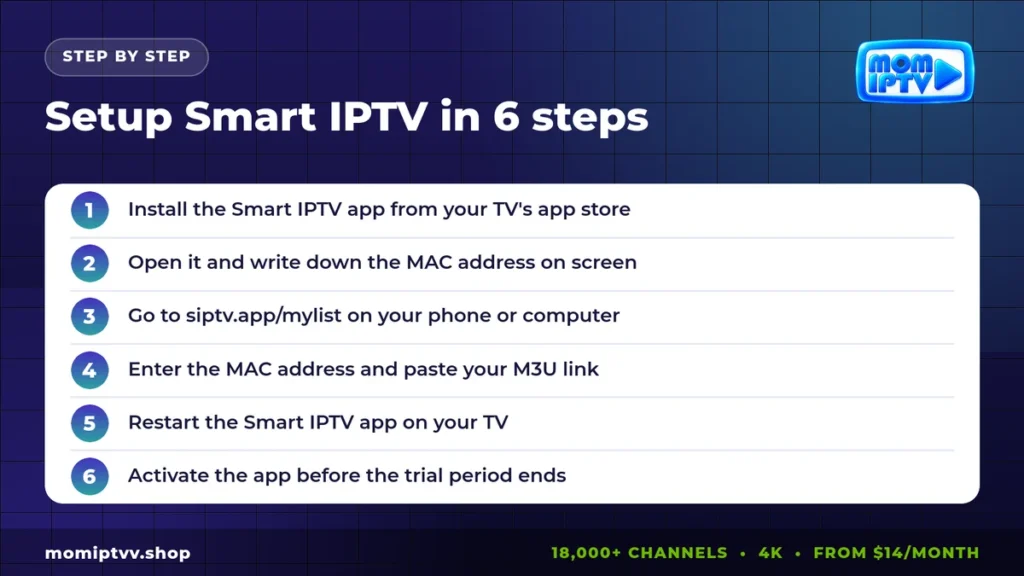
- Install the Smart IPTV app from the app store of your TV or device.
- Open the app. Your MAC address appears on the screen. Write it down carefully.
- On a phone or computer, open the official playlist page at siptv.app/mylist.
- Type the MAC address, paste your M3U link in the URL field and press Send.
- Restart the app on your TV. The channel list loads after a few seconds.
- Before the trial period ends, activate the app on the official activation page.
That is the full process. The sections below give the details for each type of device.
Smart IPTV Setup on a Samsung Smart TV
Press Home, open Apps and search for “Smart IPTV”. Install it and open it. The MAC address is shown in the middle of the screen. Upload your playlist from your phone, then press the Back button and open the app again.
If the app does not appear in the store, your region may not offer it. In that case you can use IPTV Smarters Pro instead. Our full guide to IPTV on a Samsung Smart TV explains both options.
Smart IPTV Setup on an LG Smart TV (webOS)
Press the Home button and open the LG Content Store. Search for Smart IPTV, install it and launch it. Note the MAC address shown on the screen. Upload the M3U link from your phone and restart the app.
On LG TVs, the app works best with the TV connected by cable. If channels load slowly, switch off “Quick Start+” in the general settings and restart the TV once.
Smart IPTV Setup on Amazon Fire TV and Firestick
The Smart IPTV app is not in the Amazon store, so you install the Android version with the free Downloader app:
- Go to Settings > My Fire TV > Developer Options and allow apps from unknown sources for Downloader.
- Open Downloader and type the download address given on the official Smart IPTV website.
- Install the file, open Smart IPTV and note the MAC address.
- Upload your playlist on siptv.app/mylist and restart the app.
On Firestick, many users prefer TiviMate or IPTV Smarters because of their richer menus. Both work with Mom IPTV too.
Smart IPTV Setup on Android Phones, Tablets and TV Boxes
Download the Android version from the official site, or from the Google Play Store if it is available in your country. Open the app, note the MAC address and upload your playlist as usual.
On a phone, the app is handy for watching away from home, but the controls are designed for a remote. For a phone, a player built for touch screens is often more comfortable. See our list of the best IPTV player apps for Android.
Smart IPTV on MAG Boxes
MAG boxes use a portal URL rather than an M3U playlist, so Smart IPTV is not needed there. Go to Settings > Servers > Portals, enter the portal address from your provider and restart the box. Your MAG MAC address must be registered with the provider first. Mom IPTV registers it for you on WhatsApp.
Smart IPTV App vs IPTV Smarters Pro
Many people hesitate between these two players. Here is a quick comparison.
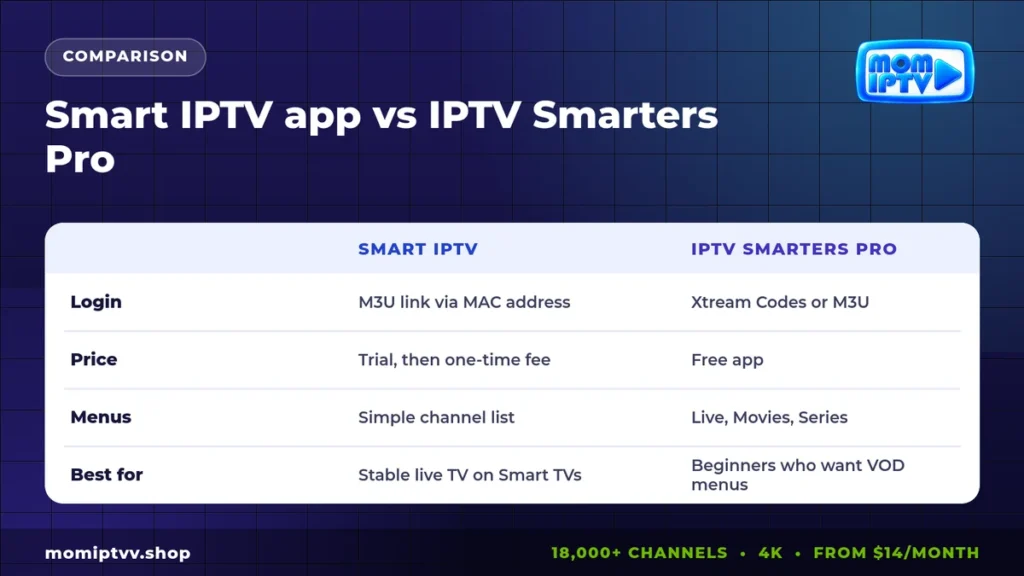
| Point | Smart IPTV | IPTV Smarters Pro |
|---|---|---|
| Login method | M3U link linked to your MAC address | Xtream Codes login or M3U |
| Cost | Free trial, then one-time activation | Free |
| Interface | Simple channel list | Separate Live, Movies and Series menus |
| EPG | Yes, if included in the playlist | Yes, loaded automatically |
| Best for | Stable live TV on Smart TVs | Beginners who also watch VOD |
If you mostly watch live channels on a Samsung or LG TV, Smart IPTV is an excellent choice. If you want an easy movie and series section, choose Smarters.
How to Activate the Smart IPTV App
After installation, the app runs free for a trial period. To keep it, open the activation page on the official website, enter your MAC address and pay the one-time fee. The activation is linked to that device for life, so a new TV needs a new activation.
Activation pays the app developer only. It does not include any channels, so you still need a subscription from your IPTV provider.
Fixing Common Smart IPTV Errors
“No playlist loaded” or empty list
Check that you typed the MAC address exactly as shown, with every letter and number in the right place. Upload the link again, then fully close the app and reopen it.
The playlist loads but channels do not play
Open the app settings and change the stream type or the internal player. Also confirm that your subscription is active and that you are not watching on more screens than your plan allows.
“Playlist is too big”
Large playlists can be slow on older TVs. Ask your provider for a smaller list with only the countries you watch. Mom IPTV can prepare a custom list for you on request.
The EPG is missing
Add the EPG link from your provider in the same upload form, in the EPG field. Then restart the app and wait a few minutes for the guide to load.
Buffering on some channels
Use a cable, restart the router and test your speed on Speedtest. If speed is good, try the HD version of the channel instead of 4K.
Tips to Get the Most From the Smart IPTV App
- Add your favorite channels to Favorites so you skip long lists.
- Use the number keys on your remote to jump directly to a channel.
- Keep a copy of your MAC address and M3U link in a note on your phone.
- Update the playlist on the website if your provider sends a new link.
- Restart the TV fully once a week to clear the memory.
Get an M3U playlist that works with Smart IPTV
18,000+ live channels, 121,000+ movies & series, HD to 4K on every device. Plans from $14/month with a money-back guarantee of up to 45 days.
Ready to Setup Smart IPTV With Mom IPTV?
Mom IPTV gives you an M3U link, an Xtream Codes login and an EPG link with every plan, so the Smart IPTV app works right away. Your subscription includes 18,000+ live channels from 98+ countries, 121,000+ movies and series, and HD to 4K quality.
Start with a free 24-hour trial to test on your own TV. When you are ready, choose a plan on our pricing page: from $14 per month, up to 3 devices and a money-back guarantee of up to 45 days.
Smart IPTV Setup FAQ
Is the Smart IPTV app free?
The Smart IPTV app offers a free trial period after installation. To keep using it after the trial, you pay a small one-time activation fee per device on the official site.
Where do I find my MAC address in Smart IPTV?
Open the Smart IPTV app on your TV. The MAC address appears on the main screen, usually at the top or in the center, as six pairs of letters and numbers.
Does Smart IPTV provide channels?
No. Smart IPTV is only a player. You need a playlist from an IPTV provider such as Mom IPTV and then upload it to the app.
Why does Smart IPTV say 'no playlist loaded'?
Usually the M3U link was uploaded to the wrong MAC address, or the TV was not restarted. Check the MAC carefully, upload again and restart the app.
Can I use Smart IPTV on Firestick?
Yes. Smart IPTV has an Android version that you can install on Fire TV with the Downloader app, then set up with your MAC address like on a TV.
Final Thoughts
To setup Smart IPTV you only need three things: the app, your MAC address and a playlist link. Upload the link on the official website, restart the app and your channels appear. Once activated, the app keeps working on that TV for years.
Need help on another device? Our step-by-step setup guide covers Firestick, Smart TV, Android, iPhone, PC, Apple TV, MAG and Enigma2.